Experimental Features
About Experimental Features
Turn on experimental features to try what’s new while we’re still putting on the finishing touches. They’re ready to use, but we’re still tinkering. So things may change (or occasionally disappear) before they’re officially released.
Once switched on, they’ll be available to everyone in your company. We’ll email you whenever a new experimental feature lands in your account, and might check in to see what you think. Switch off whenever you like.
Just go to Settings -> Experimental Features and turn on the toggle.
Can’t see Experimental Features? One of your Management-level users will need to switch it on for your company. Once they have, everyone in your company will have access.
What's currently live and being tested
Updated Sub-Nav on the left menu
UPDATED: 6 OCT 2026
Feature licence level: All
We are wanting to provide users with easier access to sub-menus within Fusion Signage.
Instead of showing only Dashboard, Design, Manage, and Deploy, the expanded sub-nav will provide quick links to templates, media, playlists, schedules, screen groups and sync groups.
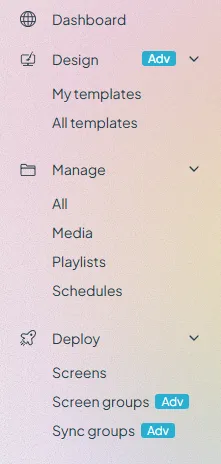
While this will benefit existing customers by providing a way to quickly navigate to each area, we hope it will provide more clarity to new customers and customers on trials as to the important elements within Fusion and what they should do next.
Content Level Scheduling - Status indicator
UPDATED: 8 OCT 2026
Feature licence level: Advanced and Pro
See if scheduled content inside your playlist is live or inactive, at a glance. This is what Jack asked for, so we created the content scheduling status indicator. Simply hover over the scheduling (calendar) icon on a media item to see its current status.
See more, when you need it. Thanks, Jack.
Please send any feedback to us at [email protected]