How to add a screen
5 min
1. Install the Fusion Signage application
Begin by installing the Fusion Signage application on your device. Each screen or media player requires its own installation and will be managed separately within the portal.
- For common devices and manufacturers, view our Installation Guides here.
- Or use your browser as a device via our Web Player here.
2. Find the identity code
Locate the unique identity code displayed within the Fusion Signage app.
Need help finding your code? Click here.
3. Purchase licences
Our free trial lasts for 21 days. To continue after that, you’ll need to purchase a licence through one of our trusted partners. If you need help finding an integrator, please contact us.
You can view our pricing options here.
4. Add a screen to your account
- Navigate to the Deploy section in your Fusion Signage portal.
- Click Add Screen in the top right corner.
- Enter the identity code from your device.
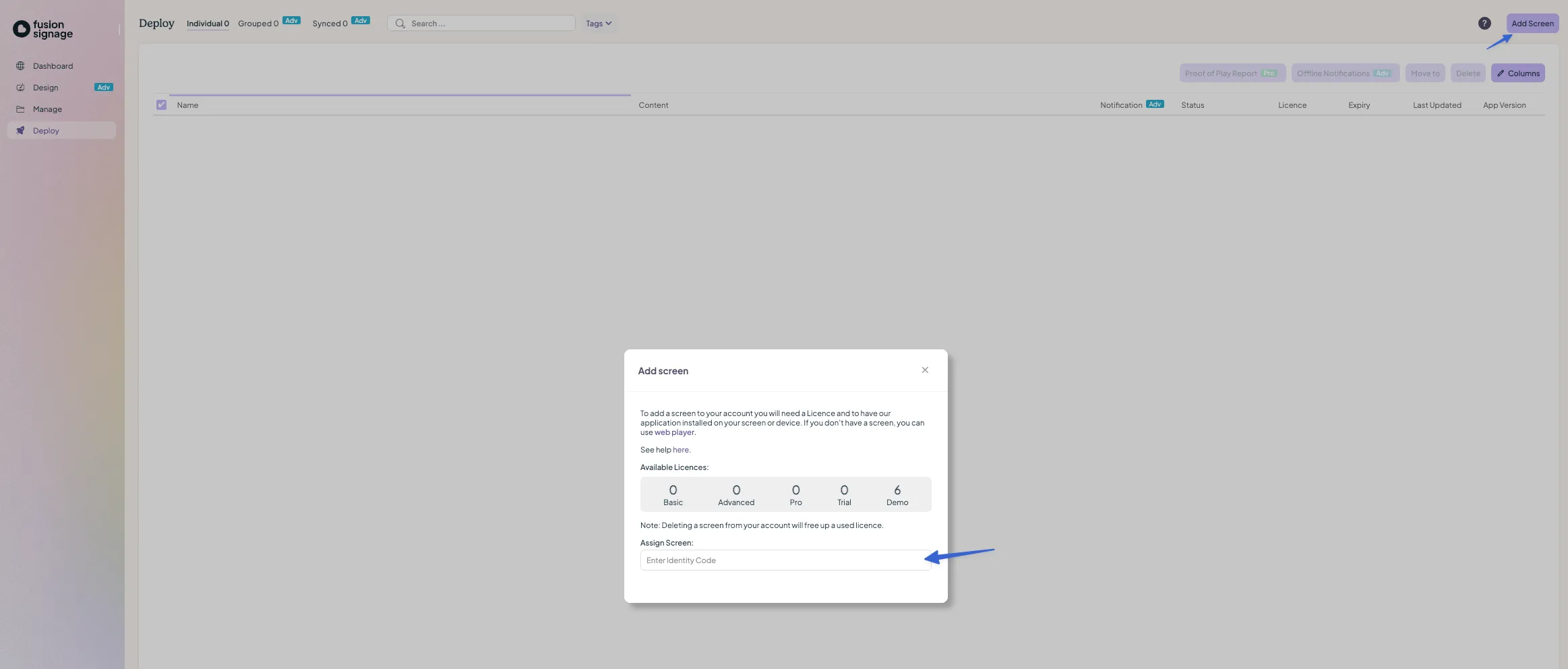
- Give your device a memorable name.
- Select the available licence to associate with the screen.
- Set the time zone for your device.
Your screen is now added!
Looking for something else?
We can’t wait to hear about it. Reach out to our sunshiney support and we'll be in touch in a flash.