How to quick publish content
Now you can add new content straight from Manage. No need to click away, hunt down a playlist, edit then publish.
This is particularly handy when you’ve just uploaded new content and want to quickly get it playing on your screens.
Simply:
- Add new media
- Hit the new Publish button
- Create or select a playlist
- Cheer🎉
Save steps, go live.
Speedy Demo
Full demo
Let’s take a closer look.
How to Quick Publish content
- Log in to Fusion Signage and navigate to Manage.
Tip: You can select multiple media items if you'd like to publish several pieces of content at once.
Add new media or select the media you would like to publish.
- Once you've selected your content, click Publish.

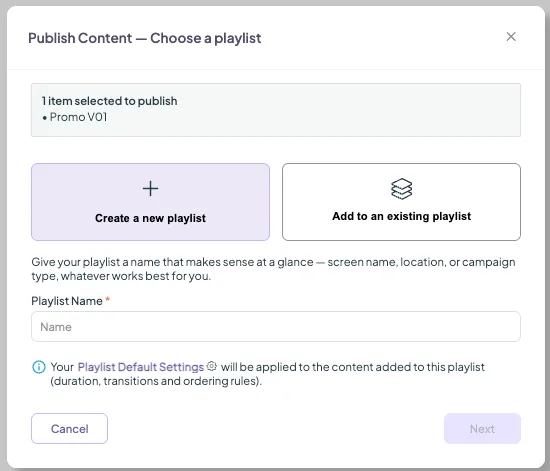
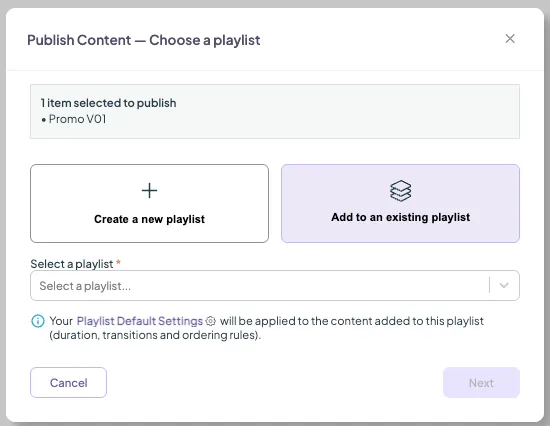
- Choose where you'd like to add your selected content: Create a new playlist: create a brand new playlist using the selected content. Add to an existing playlist: add the selected content to a playlist you've already created.
Create a new playlist
If you're creating a new playlist using your media:
- Select Create new playlist.
- Give your playlist a name.
- Click Next.
- Assign to a screen or screen group, and click Save.
Add to an Existing Playlist
If you're adding the content to an existing playlist:
- Select Add to an existing playlist.
- Using the dropdown, choose the playlist you'd like to add your content to.
- Review the number of items selected for publishing to make sure you've included everything you need.
- Click Next.
- Assign to a screen or screen group, and click Save.
Quick Publish is designed to save you a few extra steps when you're working from the Manage section. Instead of navigating away, finding the playlist, editing it and then publishing your changes, you can add your new content directly from where you are. Easy-peasy. 🎉
Looking for something else?
We can’t wait to hear about it. Reach out to our sunshiney support and we'll be in touch in a flash.