Setting an expiry date for media
Media Expiry allows you to automatically remove temporary or time-sensitive content from Fusion Signage after a specific date and time.
Once media reaches its expiry date, it will be automatically deleted from your account and removed from any playlists where it is being used.
This is a great way to keep your Media Library and playlists up to date without having to remember to remove old content manually.
When should I use Media Expiry?
Media Expiry is best suited to content that is no longer relevant after a certain date.
For example, you might use it for:
- Birthday or staff announcements
- Limited-time promotions
- Event information
- Seasonal content
- Temporary notices or updates
Instead of remembering to go back and remove the content later, simply set an expiry date and Fusion Signage will take care of it for you.
How to set an expiry date
You can set an expiry date when creating or uploading new media to Fusion Signage.
You can also add or update an expiry date for existing media:
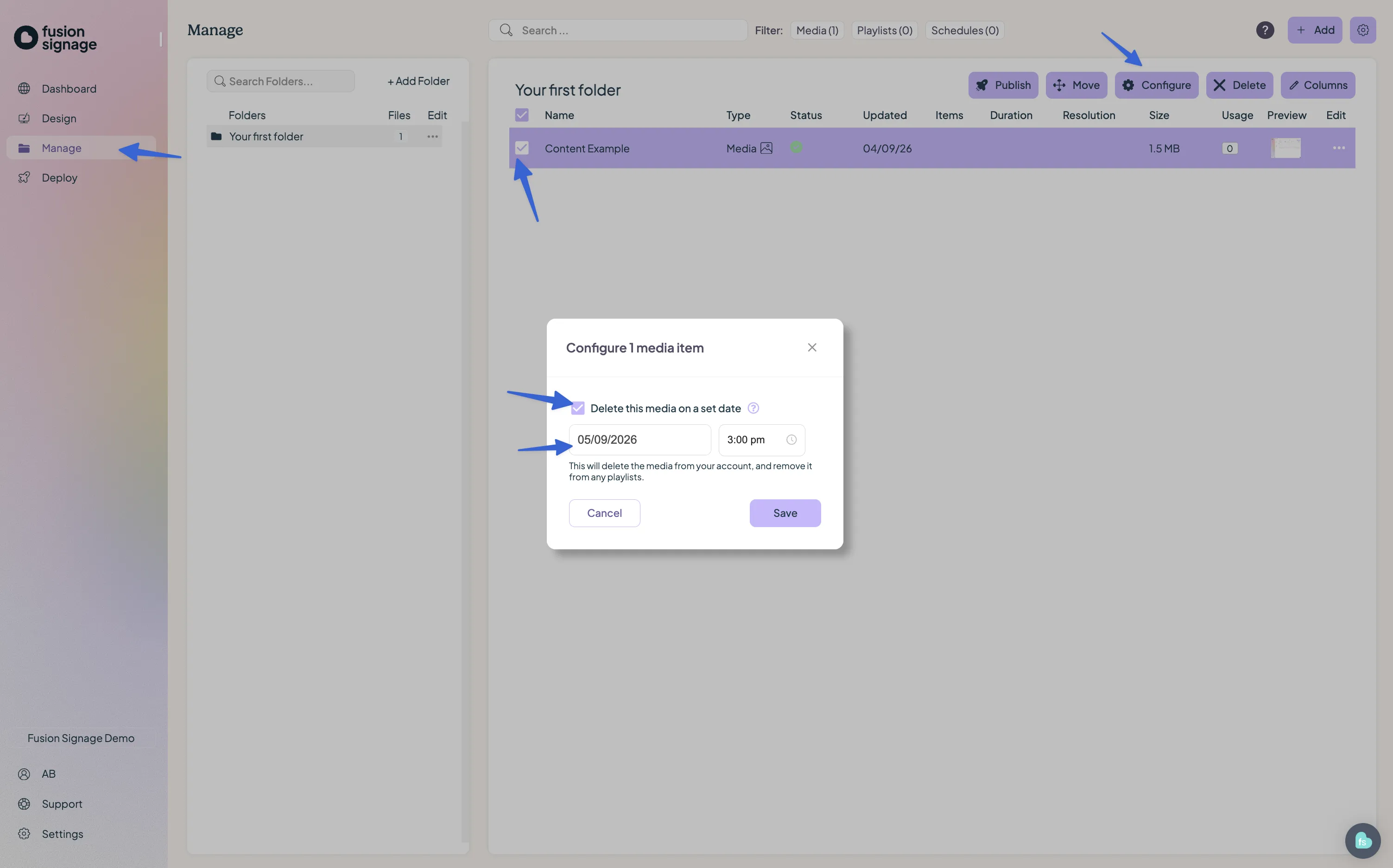
- Go to Manage.
- Find the media item you'd like to update.
- Open the Configure menu for that item.
- Set your desired expiry date and time.
- Save your changes.
What happens when media expires?
At the date and time you've selected:
- The media will be deleted from Fusion Signage within approximately 1 minute.
- The media will automatically be removed from any playlists using it.
- Screens connected to the internet should receive the updated playlist within approximately 5 minutes.
If a screen is offline or not connected to the internet, it will not receive the update until it reconnects.
Important things to know
Expired media cannot be recovered
Once media has expired and been deleted, Fusion Signage Support cannot recover it.
We recommend only using Media Expiry for temporary content or content you're confident will no longer be needed after the selected date.
Don't leave your playlists empty
If expired media is removed and this leaves a playlist with zero items, a screen currently playing that playlist will not automatically update.
Before setting expiry dates, make sure there will still be other content remaining in the playlist after the media expires.
Tip: Consider keeping evergreen or default content in your playlists so they aren't accidentally left empty when temporary media expires.
Looking for something else?
We can’t wait to hear about it. Reach out to our sunshiney support and we'll be in touch in a flash.