What are widgets?
Dynamic widgets are powerful tools within the Designer that enable you to embed real-time information into your content. They enhance engagement by providing live updates – think: news, weather, social media feeds, and event schedules. Fusion Signage's widgets are designed to be dynamic and interactive – allowing viewers to engage directly with the content for a more personalised experience.
A technical note: most widgets are built using web technologies like HTML, CSS, and JavaScript. They are hosted on web servers and can be updated remotely, ensuring your content stays current and relevant.
Available dynamic widgets
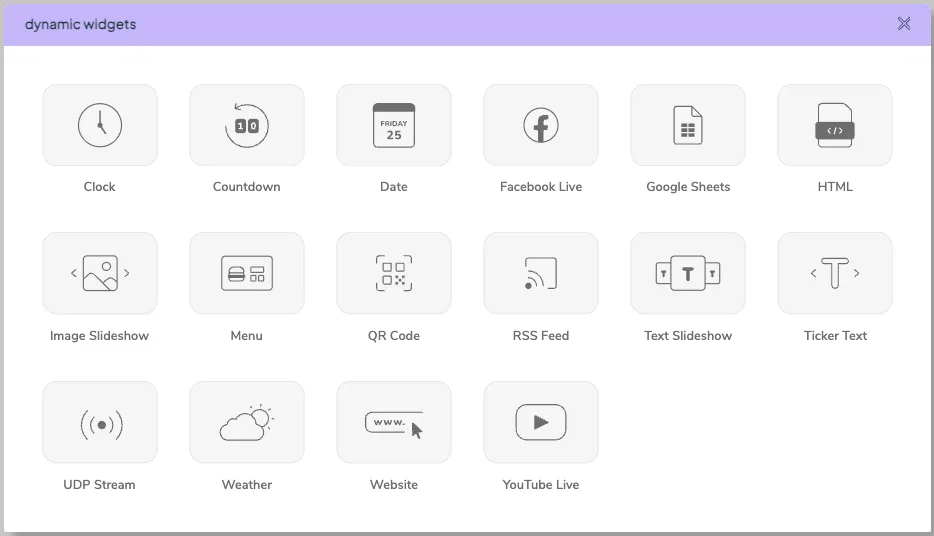
Clock
Displays the current local time.
- The time is based on your device's settings, so ensure the timezone is correct.
- Deploy across multiple screens to show local time in each location.
Countdown
Display a countdown to a specific date and time. Select a date and time to countdown to, then set the appropriate timezone.
Date
Shows the current date. Like the Clock widget, it uses your device’s timezone.
Facebook Live
Embeds a live Facebook video. Enter the URL and toggle audio as desired.
Google Sheets
Allows you to connect a Google Sheets document directly to your content, making updates quick and effortless
- Make updates to multiple designs at once – no need to re-publish.
- Connect your Google Sheets data directly to specific screen elements.
- Customise text and display styles to perfectly match your brand.
See this support article for more information.
HTML
Allows you to embed custom HTML code to pull data from external sources – ideal for live feeds from POS systems, event managers, tram schedules, and more.
- No limits on content, but you’ll need to supply the HTML code.
- Great for integrating real-time data from any compatible system.
Image slideshow
Displays a slideshow of images from your media library or Unsplash. You can set transition speed and effects for a smooth presentation.
Menu
This is how you integrate your POS system into your designs. Currently we support Redcat and Task.
QR code
Adds a QR code to your display. Paste the target URL into the box, and a QR code will be generated for viewers to scan.
RSS feed
Displays content from an RSS feed.
- Shows the latest news headlines, brief descriptions, and optional images.
- Enter the feed URL and customise display options to suit your style.
Text slideshow
Cycles through multiple blocks of text.
- Add as many text blocks as needed, and they will scroll through continuously.
- Fully customisable via the editing toolbar.
Text ticker
Displays scrolling text across the screen. Insert your text and customise scroll speed, spacing, font size, colour, and style.
UDP Stream
A BrightSign specific feature. Allows you to stream IPTV, live video feeds, and other real-time content directly into your Fusion Signage layouts using User Datagram Protocol (UDP) over your network.
- Enables live content playback without requiring external players or additional hardware.
- Seamlessly embeds live video within custom layouts created in Fusion Signage.
- Perfect for applications requiring up-to-the-minute information, such as news, sports, or security footage.
Weather
Provides weather information.
- Not tied to time zones: set your area using the dropdown at the top.
- Displays as temperature, description, or an icon – multiple weather widgets can be used simultaneously with different formats.
- Click on "Apply all" to make changes to multiple weather formats at once.
- Click on "Show example" for an example weather report.
- Data sourced from OpenWeatherMap.
Website
Embeds a public webpage into your display.
- The URL must be accessible publicly and embeddable within an iframe.
- Check via 'iframe checker' tools to ensure compatibility.
YouTube Live
Streams a live YouTube video.
- Enter the video URL and toggle audio on or off.
- Uses your local internet connection for streaming.
- For bandwidth efficiency, consider uploading the MP4 version if available, instead of streaming via YouTube.
Youtube widget audio issues
If using our Youtube widget within the Designer you may experience no audio when deploying it to your screen. We do attempt to play the video with audio, however if we detect that video playback has not started (because it is being blocked), we attempt to replay the video muted to get around this restriction. This is a precaution to avoid a situation where Youtube believes the device is a bot and prevent displaying the video at all.
Unfortunately this is a restriction imposed by Youtube and there isn’t anything Fusion can do to overcome it.
If this occurs, we recommend trying to download the original video and uploading it directly into Fusion Signage. This will have the added benefit of not streaming the content throughout the day as it plays.
Please note: some YouTube videos restrict embedding in browsers that do not support iframes. If a video doesn’t display, it’s likely due to permissions from YouTube.
Final tip: widgets are an awesome way to make your signage more engaging. Experiment with different options to see what works best for your audience.
Looking for something else?
We can’t wait to hear about it. Reach out to our sunshiney support and we'll be in touch in a flash.